
The purpose
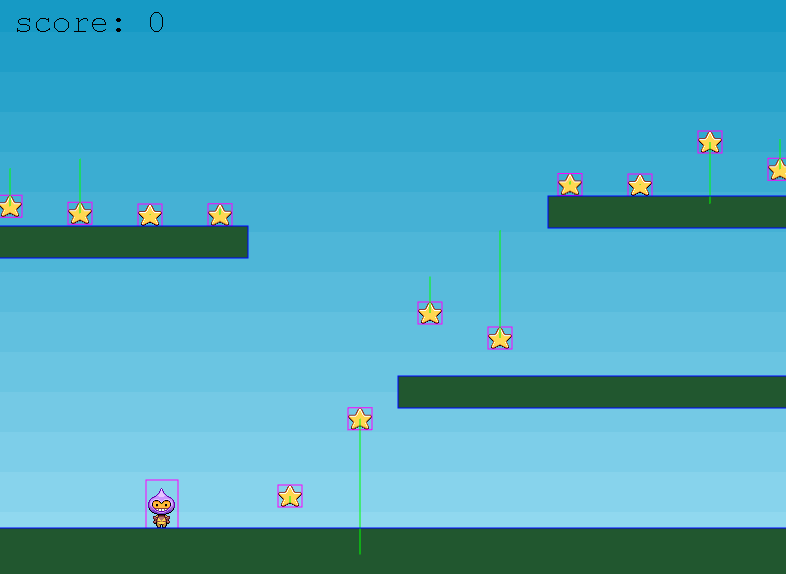
This shows how to display the hitboxes of the Arcade physics engine in Phaser 3.
You often see captures of Phaser3 games with bounding boxes around characters and items;
this code demonstrates how to achieve that. We’ll use Phaser3 Tutorial Part 10 as a reference example.
You can find the code download and comments on the following page

Physics engine configuration
Add debug: true to the physics section of the Config passed to the Game class, as shown below.”
    physics: {
        default: 'arcade',
        arcade: {
            gravity: { y: 300 },
            debug: true
        }
    },
Use for Phaser3 Turtorial
The tutorial’s configuration is as follows.
var config = {
    type: Phaser.AUTO,
    width: 800,
    height: 600,
    physics: {
        default: 'arcade',
        arcade: {
            gravity: { y: 300 },
            debug: false
        }
    },
    scene: {
        preload: preload,
        create: create,
        update: update
    }
};
correct this as follows
var config = {
    type: Phaser.AUTO,
    width: 800,
    height: 600,
    physics: {
        default: 'arcade',
        arcade: {
            gravity: { y: 300 },
            debug: true         //////Trueに変更
        }
    },
    scene: {
        preload: preload,
        create: create,
        update: update
    }
};
Result
Hitboxes (purple boxes) are now displayed for each individual item, as shown below. (Green lines represent item velocity.)
コメント