
The purpose
This explains how to set up collision detection using the Arcade Physics engine in Phaser 3.
We’ll follow the example from Part 10 of the Phaser 3 tutorial.
Code downloads and comments are available on the following page [link to page].

Prepare
First, please refer to the following page to display the collision detection.
Collision detection settings
Rectangle setting
Call setSize() and setOffset() on objects (like sprites) inheriting from Phaser.Physics.Arcade.Components.Size.
setSize(width, height, [center])Here are the arguments for SetSize.
Width:Collision detection Width
Height:Collision detection Height
center:true sets the specified size to the center of the object. Passing false sets the specified size to the top left of the object. The default is true.
setOffset(x, [y])Here are the arguments for setOffset. (This is unnecessary if specifying the object’s center.)
x:x-offset from the top left
y:y-offset from the top left
There’s also setBodySize(), but sometimes it couldn’t be called even when creating the object in the same way.
Circle setting
Call setCircle() on objects (like sprites) that inherit from Phaser.Physics.Arcade.Components.Size.
setCircle(radius, [offsetX], [offsetY])Here are the arguments for setCircle. (They are optional if you are specifying the object’s center.)
radius:radius of circle
offsetX:x-offset from the top left
offsetY:y-offset from the top left
Use on Phaser3 Turtorial
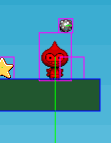
In the tutorial, the hitbox on the Player’s head is too large, as shown in the following capture, causing a sense of incongruity.
Adjustment by rectangle
After creating the player, setSize(32, 24).setOffset(0, 24) is called.
    // The player and its settings
    player = this.physics.add.sprite(100, 450, 'dude');
    player.setSize(32, 24).setOffset(0, 24);    ///追加
The collision detection area is a 32×24 rectangle (specified by setSize), starting from the top-left corner, offset by x=0, y=24 (specified by setOffset).

Adjustment by Circle
After creating the player as shown below, setCircle(16, 0, 16) is called.
    // The player and its settings
    player = this.physics.add.sprite(100, 450, 'dude');
    player.setCircle(16, 0,16);
The collision detection rectangle has a radius of 16 (specified by the first argument) starting from the top-left corner, moved x=0, y=16 (specified by the second and third arguments).
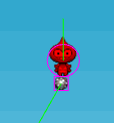
Note that the specification is in radius, not diameter.
This time, we’ve set the radius to 16 (32/2) to match the image width of 32px.
Result
We are able to set up collision detection.
Reference

コメント